Wichtig / Important !
Da mit Google Chrome nur über Umwege Downloads möglich sind, wird empfohlen Firefox oder Opera zu nutzen. Es ist aber auch möglich Dateien unter Google Crome oder Edge herunterzuladen. Einfach rechter Click mit der Maustaste auf das Symbol bzw. Link „Download“ und dann „Ziel speichern unter“ wählen. Eventuell muss man noch die Downloads von der Seite erlauben.
English (google): Since downloads are only possible indirectly with Google Chrome, we recommend using Firefox or Opera. However, it is also possible to download files from Google Crome or Edge. Simply right click with the mouse button on the symbol or link "Download" and then select "Save target as". You may have to allow downloads from the site.
Informationen

We use cookies
Deutsch- Cookies erleichtern die Bereitstellung unserer Dienste. Mit der Nutzung unserer Dienste erklären Sie sich damit einverstanden, dass wir Cookies verwenden.
 Sudden Save Copilote
 For Sudden Strike 2 and its derivatives, notably Hidden Stroke 2 Fusion (but not only).
Partial compatibility with Sudden Strike Forever (has to be tested for Resource War - but should work, is my guess).
⚙️ Requirements:
- Windows system (Windows 7 or later)
- must be launched in administrator mode!
Recommended but not required:
- place it in your game's executable folder (usually "game_exe.exe") — the program will then try to automatically locate your save and map folders.
Detailed description
A small companion program, made by a fan for the entire player community. If you play multiplayer on Sudden, you've surely experienced the frustration of a crash while the save of your game is either non-existing ("we forgot to save!"), or too ancient ("what do you mean, HALF AN HOUR ago??"). Good news: manually saving every few minutes, more or less successfully, is now a thing of the past. There were already a few tools made a long time ago by German-speaking fans, but this solution aims to be more complete. Sudden Save Copilote is here, built to make life easier. No installation required — a single exe file that loads quickly. It runs in the background alongside the game.
It is in French, but the same way the French community used German or English tools, it shouldn't be complicated to decypher this one. Here's some help:
🕹️ "Current Game" tab
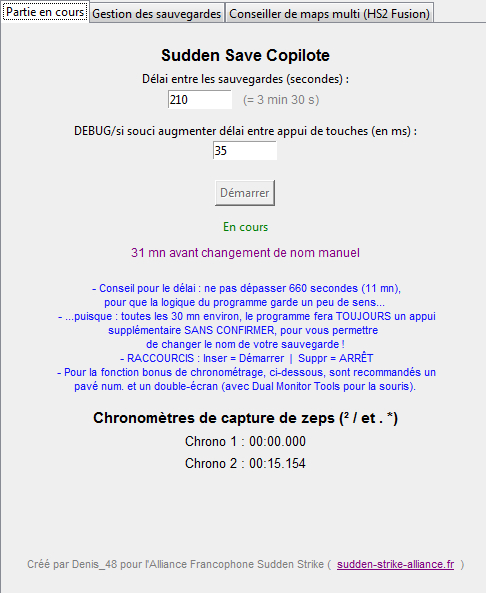
The heart of the program. Once started, it automatically presses F11 (then "F11-enter-enter") and saves at regular intervals, and automatically overwrites as the game progresses. Shortcuts :
- Insert = Start the save cycles
- Delete = "EMERGENCY STOP" (useful if a player drops)
One important thing to understand: every 30 minutes and 15 seconds, the usual cycle deliberately pauses — this is the only moment where the tool does NOT automatically overwrite your save. This brief window gives you the chance to manually rename the save. This isn't a random quirk. It might seem like a hassle, but we've already witnessed invalid or "corrupted" saves after a while, and this is one of the reasons (among others) why renaming regularly the file (writing a new save file) is, in our view, the safer approach. A small message shows you when this manual renaming moment is coming up, and how much time remains before it does.
Bonus: two small stopwatches provided for those who want to precisely time zeppelin captures. To get the most out of this bonus feature, a numpad and a dual-monitor setup are recommended (with the program Dual Monitor Tools to keep your mouse in check).
Best practices:
- Only one dedicated person handling automatic saves per game (or per session).
- Recommended save cycle: between 3 and 4 minutes — this is actually the program's default value, the one that gives the most satisfying results in multiplayer.
- For each name change (every half an hour), there is no need to overthink it: just add a digit at the end of the name (1, 2, 3...) and confirm with Enter.
- If anything goes wrong during the game, especially in case of a "Drop player" (a player disconnecting), it's strongly recommended to immediately stop the automatic cycles using the Delete key.
- Failing to do so risks an imminent overwrite of the current save with an incorrect version — one missing the player who just dropped. And if that happens... "that's all for tonight folks, thanks for coming!"
💾 "Save Management" tab
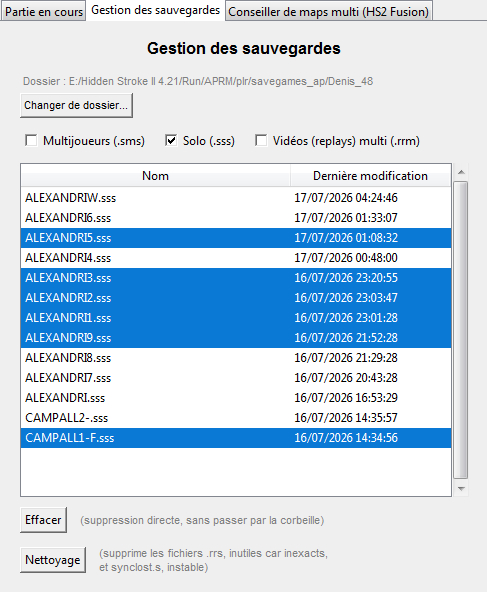
All of this creates saves... way too many of them (the game doesn't like that).
So here's a second tab with a clear list of your saves — multiplayer, single-player, or replays — sorted by date. Select and delete whatever you no longer need with a single click. You can also run a "Cleanup" that clears out useless "RRS" files the game leaves behind... and, most importantly, deletes the synclost.s file! The legendary bane of multiplayer players.
🗺️ "Multiplayer Map Advisor" tab
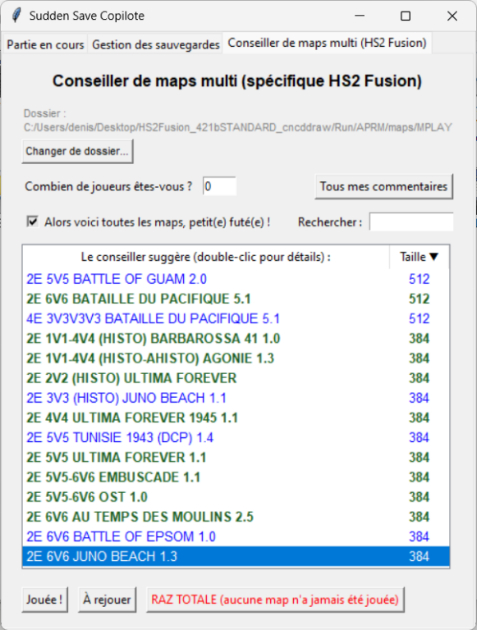
Probably the most advanced part of the program. Enter how many players you are, check the number of teams you want, and the advisor automatically suggests maps it considers compatible — taking into account fairly detailed rules built into its logic (asymmetric team splits handled case by case, for example).
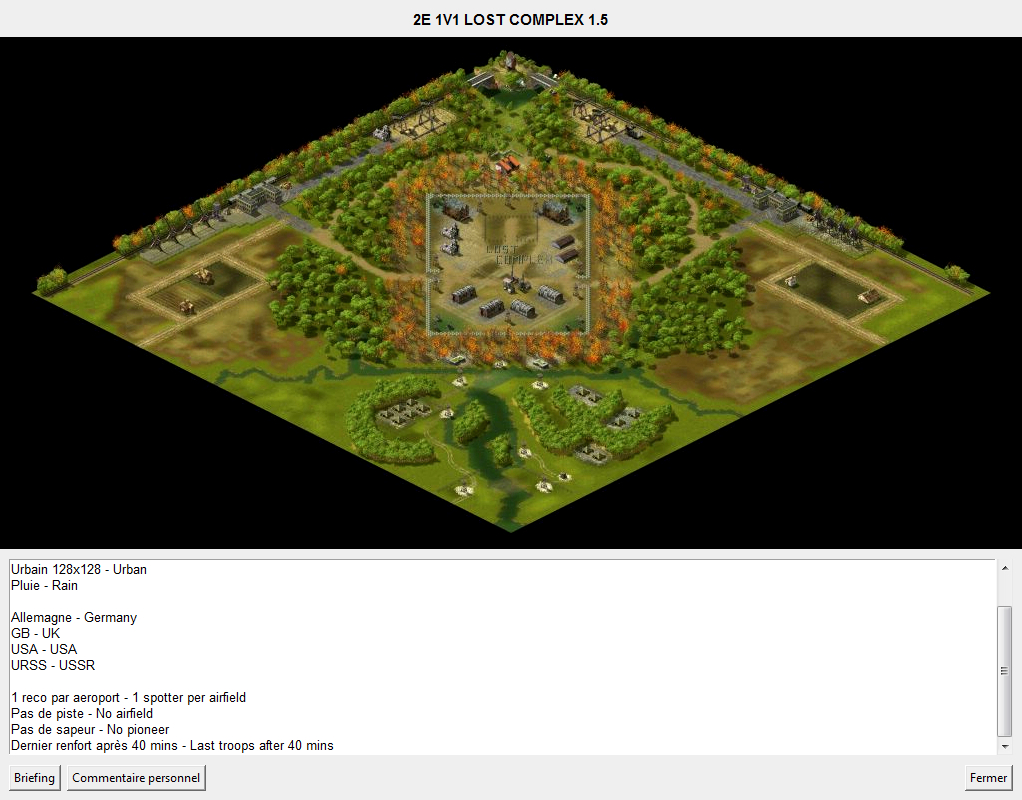
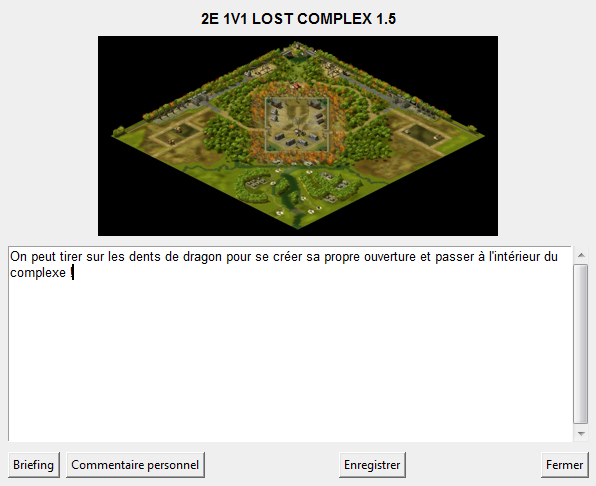
Also, feel free to double-click on a map in the suggested list to see its full briefing and thumbnail ("M-key map"), extracted directly from the file itself — with brightness and contrast automatically adjusted depending on whether it's a standard or winter map. You can zoom through two levels by clicking on the thumbnail. At maximum zoom, you can navigate using the mouse wheel or a middle-click drag.
You can mark maps as already played, keep personal notes on each one (your own private notebook), sort the suggested maps by size, and search for a map you know is present in the suggestions by typing a few characters of its name.
So why is this tab supposedly "only for HS2 Fusion"? Because the program looks for maps named following these rules, which only our mod uses (for the moment?):
- The map name must first contain an first "block" of letters — in our map pack, this is: 2E ("2 équipes", 2 teams), 3E (3 teams), 4E (4 teams), indicating the mapper's intent on this matter. This is mainly meant as an indication for players and for sorting the list within the game itself. The Copilote only expect a first block of letters/numbers to be present, regardless. Should work if you put "2T", "3T", etc.
- Next comes a block indicating the number of players per team (2V2, 3V3V3, etc.) or the intended range (example: "3V3-5V5" means the map is also compatible with 4V4).
- This results in names such as "2E 2V2-4V4 LETZTEN KAMPF 1.4".
Without these names, the program would be somewhat lost and essentially unable to suggest anything. In that case, you can still view all maps in a multiplayer folder by entering "0" in the "How many players are you?" field.
Created by Denis_48 for the French-speaking Sudden Strike Alliance (current version: 1.2). Feedback, discussion, and improvement suggestions are welcome on our community Discord.